
How AI helps me with repeat work.
Hey there, thanks for reading The Playbooks AI! This week I want to show you how I have been handling repetitive work, using AI, without having to go start a new AI chat every time.
Since not everyone is at the same place with AI, below I break the topic down three different ways. Pick the one that fits you best!
Why this matters: I found myself being the bottleneck in my work. Everything usually waits on me to start it. So I have been going through my work piece by piece, identifying the bottlenecks, and trying to introduce a concept called loops. I have not automated everything just yet, but below I walk through how I am approaching it.
The full guide for this is on our site.
- •New to AI: What kind of work is worth handing off, and how to spot yours.
- •Everyday user: What a loop is, and how to design one.
- •Power user: The loops I run every week, and the one I am still building.
- •Also this week: Gemini types what you say on a Mac, a court ruled your AI agent counts as you, and AI keeps getting cheaper.
What kind of work is worth handing off?
I am writing this with my mom in mind. She is not technical, but I watch her repeat the same work each week, and I know she would love to hand some of it off.
The analogy I picture is a thermostat. You set the temperature, and it keeps the house there.
Work to me is very similar. I want a clear inbox, and my clients' website security issues handled. Every week though, new tasks come up and pull me away from that.
So here is how to identify where a loop could help you:
- Do you go through your email figuring out which ones need action?
- Is there a list, a sheet, or report you keep updating?
- Is there something you keep checking to see if it changed?
If you said yes to any of those, you most likely already have a loop. You are just the one running it.
Why it matters: these tasks might be small, but doing them over and over adds up.
Your next step: identify one thing you keep having to do. Our guide walks you through setting up a loop for it. (This needs a paid account, and it is worth it.)
What a loop is, and how to design one.
My girlfriend runs a schedule change process at work. A form comes in, then she updates the student schedule, two calendars, and the attendance sheet. Four places have to change every time.
This is not automated today, but it is a real problem. Here is how I would design a loop for it. I would identify the following:
- When it runs. Every hour, or when a form arrives?
- The job. Which places need to change?
- What good looks like. What needs to match?
- When it is unsure. Stop and ask instead of guessing.
It would connect to her work account to reach the form and calendars, so that access has to be set up first. The loop itself is simple though: read the request, make the changes, review that the calendars match, and mark it complete.
Put together, the process looks like this:
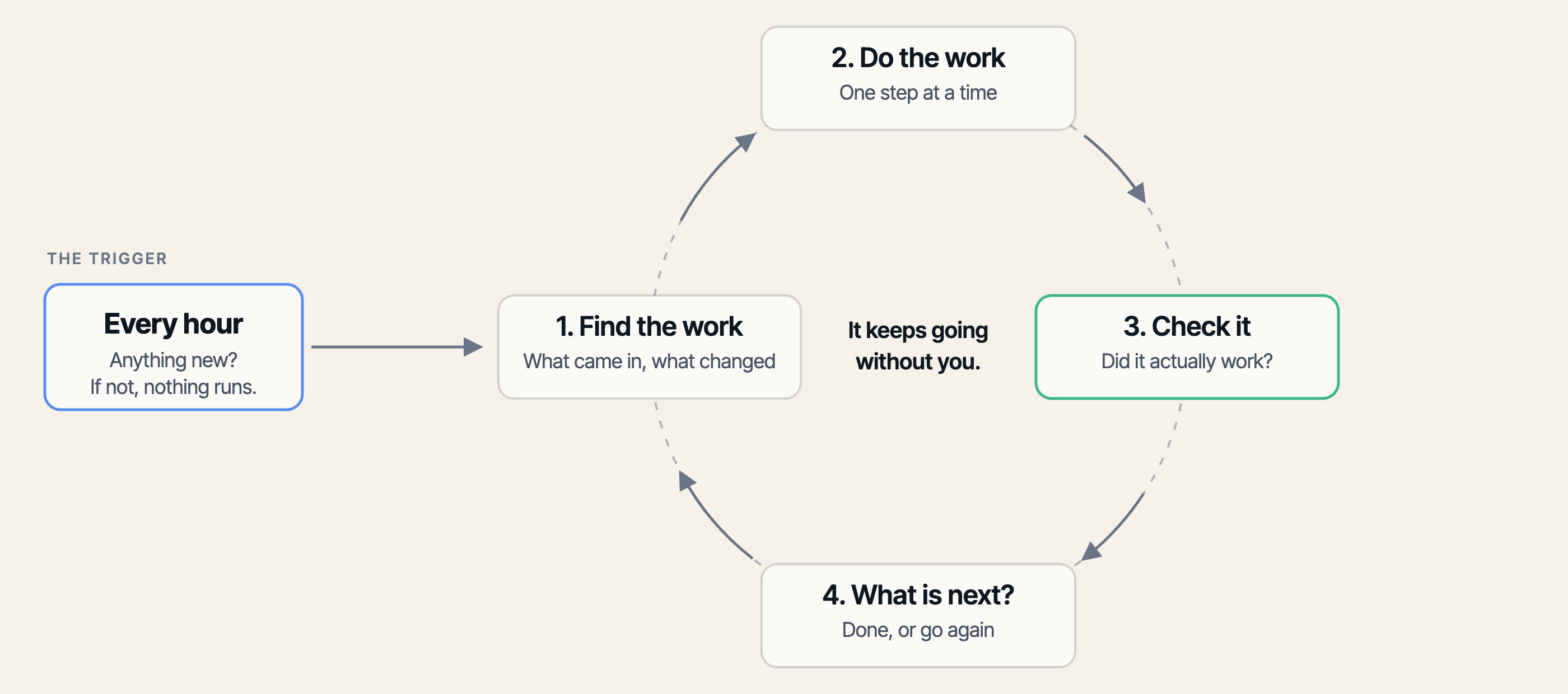
Why it matters: a task like this may not take long, but it comes back every week. It is worth automating to get that time back.
Your next step: answer those four questions for one repeat job. Our guide walks you through building a simple loop in ChatGPT, Claude, or Gemini.
How I run my loops, and what I am still building.
Here is what this looks like in my week.
Email deliverability. An agent checks my email reports for messages getting quarantined or failing to reach clients. It investigates on its own and only tells me when something needs me.
Client site updates. Every week an agent checks my client projects for security issues and pending updates. It works out what is safe to merge and what needs testing. Instead of hunting for problems, I get told which ones need me.
What I am still building. Ideally I want all my open work tracked in one place and always moving. One agent scopes a task, another works on it, and another reviews it. I want to manage a series of loops instead of each AI individually.
A different agent at each stage catches more problems. The reviewer had no hand in the work, so it is not defending it.
Why it matters: my own use cases lean towards coding, but managing loops instead of each AI is where I think work is heading.
Your next step: do not just identify where a loop could work. Automate one job end to end.
- •Gemini can now type what you say, anywhere on a Mac. Google's Mac app added voice typing on July 29. Hold the Fn key, talk into any window, and it writes clean text where your cursor is. It strips out the ums, so a long email takes a minute instead of ten.
- •A court ruled that when your AI shops for you, that counts as you. A federal appeals court lifted the ban that kept Perplexity's shopping agent off Amazon. The court said Perplexity did not break in. You did, using the agent as a tool. Worth knowing before you point one at an account you care about.
- •AI keeps getting cheaper. On July 30, OpenAI cut the price of its cheapest model by 80 percent. These are the prices companies pay to build with, not your subscription. But the direction is the point: good AI keeps getting cheaper, which puts it inside more of what you already use, and within reach for a lot more people.
See you next week,

Ky Tomita, The Playbooks AI