How AI can help you tackle repeat work.
There is work you redo every day or every week. Instead of doing it by hand, you can build a loop and have AI handle it, without opening a chat every time.
Overview
Most of us use AI one question at a time. You ask, it answers, you ask again. That makes you the bottleneck, because nothing happens until you start it.
Some work never really ends. Sorting the inbox. Chasing an update. Checking whether anything changed. You do it, and next week it is back.
By the end of this page you will have one of those running on its own, so it keeps happening without you starting it.
What you need
- A paid plan on ChatGPT, Claude, or Gemini. Scheduled work is not on the free tiers.
- About ten minutes.
Instructions
1. Think of it like a thermostat
This is a loose metaphor, so bear with me.
A thermostat has a target. You set the temperature, it checks the room, and it turns on whenever the room moves away from that target.
A lot of work has a target too. You want your inbox clear, your tracker current, and your bills paid. New work keeps changing that, so you keep doing small tasks to get back where you want to be.
A loop takes that job. It runs on its own, checks, and acts when something needs doing.
2. Find yours
A few questions to help you spot this kind of work in your own week.
- Do you go through your email figuring out which ones actually need you?
- Is there a list, a sheet, or a report you keep updating?
- Do you check the same thing over and over to see if anything changed?
- When one form or email comes in, do you then have to go update three other places?
If you said yes to any of those, you already have a loop running. The only catch is that you are the one running it.
That last question is the best one. When one thing showing up creates a pile of small updates, the work is real but none of it needs your judgment. That is the easiest kind to hand over.
Pick one of your own before you go further.
3. How a loop is shaped
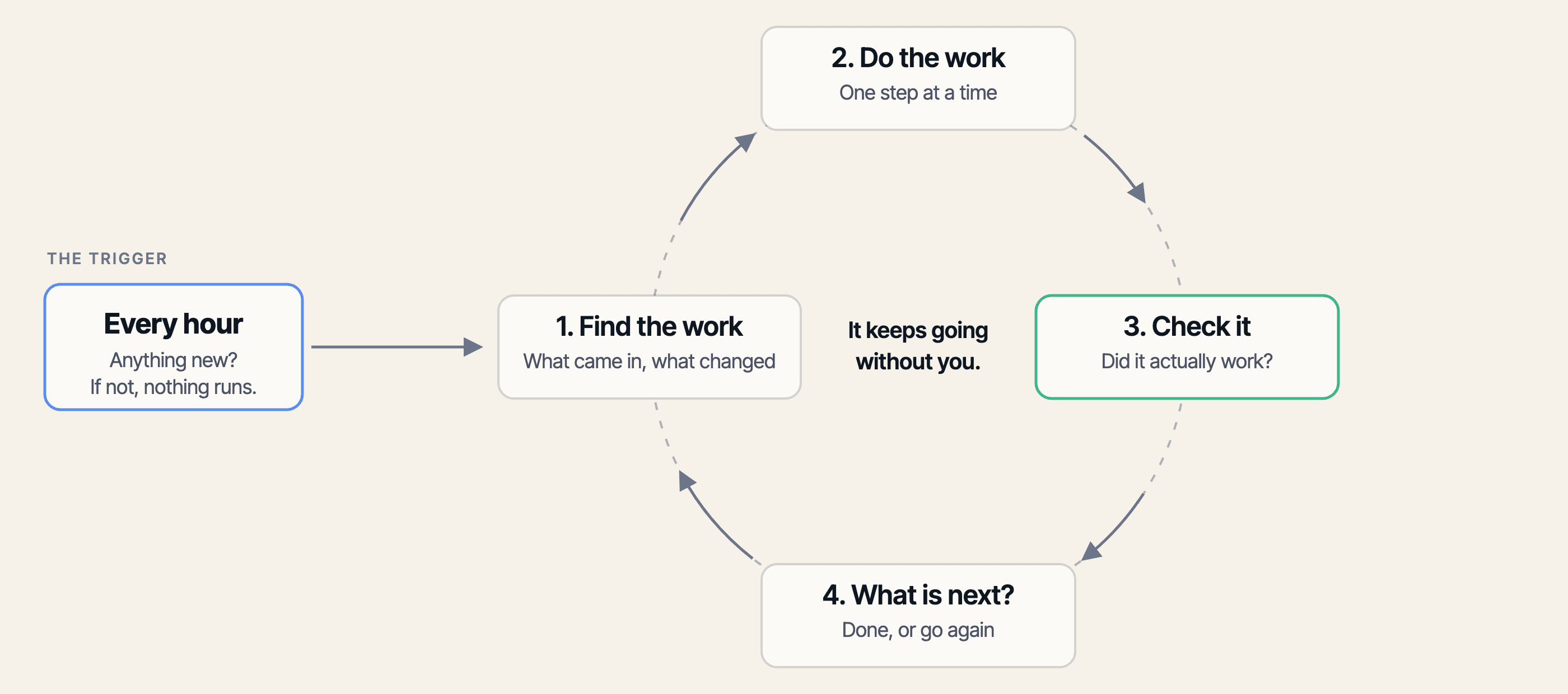
Every loop has a trigger on the outside and a short cycle on the inside.
The trigger decides when it wakes up. The cycle is what it does once it is awake: find the work, do it, check it, and decide what is next.
4. Write it out, in four parts
Now put your own job into that shape. Four things to answer.
- When it runs. A time, like every weekday at 7am. Or an event, like a new form coming in.
- The job. Write it like you would tell a person. Not emails, but tell me which emails actually need me today.
- What good looks like. The length, the order, the format. If you do not ask for it, you will not get it.
- What to do when it is unsure. Give it a rule, so it does not guess and hand you something wrong.
Write those four out in plain sentences. That is the prompt. It is the whole instruction the loop follows every time it runs, so it is worth being specific.
You will paste it into your tool in the next step. Here is a finished one you can copy and change: it reads your inbox each morning, works out which messages actually need you, and reports back in a short list.
All four parts are in here: when it runs, the job, what good looks like, and what to do when it is unsure.
Every weekday at 7am, go through my inbox and tell me which emails actually need me today.

Put the most important first. Keep it under ten lines.

If you are not sure whether something matters, put it at the bottom and tell me why.
5. Set it up in your tool
First, connect what it needs to see. A loop can only use what you have given it access to. In ChatGPT, that is under Apps. In Claude, connectors live in settings. In Gemini, connect the Google apps on your account and turn on Keep Activity. Connect only what this loop needs (more on what each permission gives away).
Then create the schedule. Pick the tool you already use, paste in the prompt from step 4, choose when it runs, and save it. All three need a paid plan.
- ChatGPT. Open Scheduled in the sidebar and create a new task, or ask in any chat and include when it should run. Manage it from the Scheduled page.
- Claude. Open Scheduled in the sidebar, then New task. Choose Create with Claude or Set up manually. Cloud tasks keep running with your laptop shut. A task that needs files or apps on your computer needs the computer awake.
- Gemini. Ask Gemini and include when it should run. Manage it under Settings and help, then Scheduled actions. You can have ten active at a time.
Finally, test it once. Run the task now, check the result, and confirm when it will run next. If it cannot see what it needs, reconnect the app before you leave it running.
6. Keep it short when there is nothing to do
The whole point of a loop is to take work off you. If every run hands you three paragraphs to read, it has added work instead.
Here is the part worth knowing. Telling it to stay silent does not really work. The task still runs on schedule, and you will still find a result sitting there waiting for you.
What you can control is how much it says. Ask it to tell you plainly when something needs you, and to answer in one line when nothing does.
Then a run you can ignore takes two seconds to skim instead of two minutes.
Add these lines to the end of any loop you set up.
Without this, a quiet week still comes back as an essay, and you will stop reading them.
If there is something I need to do, tell me what it is and what you suggest.

If there is nothing, reply with one short line saying there is nothing that needs me. Do not explain.
7. One I run, one I would build
One I run today. My Weekly website security triage reviews my client sites for open security alerts and pending updates. It works out which fixes are safe to merge, flags what is blocked, and sends me the next actions. It runs Friday at 9am and only needs me when it finds something.
One I would build. My girlfriend runs a schedule change process at work. A form comes in to move a session, and that one form means four things have to change: the student schedule, two calendars, and the attendance sheet. Then she checks off each one. It is repetitive admin work, but it has to be done.
This one is not automated yet. It is a real problem she described, and here is how I would approach it: check the form every hour, read each new request, make the changes, confirm the calendars match, and mark it complete.
It would need to connect to her work account and reach the form and calendars. The clearer you are about where everything lives and what to update, the better the loop will work.
8. Optional: split the job when it needs help
Start with one agent running the whole loop. That is how my security triage works now, and it is enough.
If the result needs work, you can split the job into stages or have a separate agent review what the first one did. A fresh reviewer is more likely to find problems because it had no hand in making the work (more on that in our guide on checking AI's work).
You can test the review idea manually by opening a fresh chat to check the first result.
You do not need this on day one. Automate one job from start to finish first.
Where to start
Set up one loop this week. Just one, and make it the email one.
Take the prompt from step 4, connect your email, and set it to run each morning. That gives you a short list of what actually needs you before you open your inbox. If daily feels like too much, make it weekly.
Then add the lines from step 6 so a quiet day comes back as one line instead of an essay.
Give it a week. If you are reading it, keep it and build a second one. If you are not, you picked the wrong job. Pick a different one and try again.