
How to pick the right AI tool for any job.
Hey there! This week I want to answer a question people ask all the time: "Which AI should I use?"
That sounds like one question, but it is really a few stacked together: the app, the model inside it, the workspace it runs in, and what your plan actually gives you access to.
The better starting point is the job. I recorded a full walkthrough and turned it into an AI Basics page: How to choose the right AI tool. That page is the full guide; this issue is the highlights. In one line: name the job first, then pick the tool that can see the right context, do the right kind of work, and fit your cost, privacy, and access constraints.
- •New to AI: know what you are actually comparing. An AI tool, an AI model, and a workspace are not the same thing. ChatGPT, Claude, Codex, Copilot, Gemini, and Perplexity can overlap, but they do not all live in the same kind of workflow.
- •Everyday user: start with the job. Ask what you are trying to produce, what the AI needs to see, and whether the AI should only advise or actually work inside files, code, research, or another app.
- •Power user: constraints change the answer. Cost, usage limits, data sensitivity, connected apps, and team needs can change the answer. The smartest model is not always the right tool for the job.
- •Also this week: models, access, agents, and AI video. GPT-5.6 launching Thursday, five extra days of included Fable 5, Claude Cowork going mobile, and Higgsfield's rise all point to the same lesson: tool choice keeps changing.
First, know what you are actually comparing.
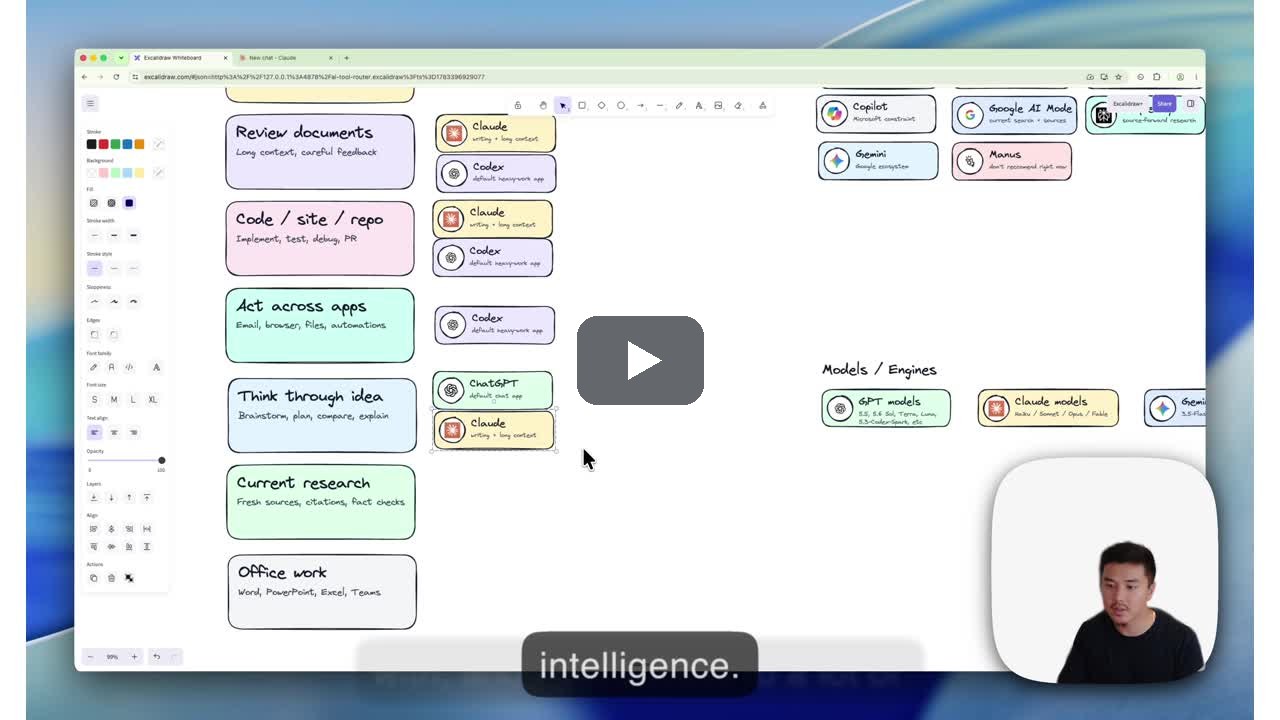
When someone asks, "Which AI is best?", they may be asking four different things at once.
- The app: ChatGPT, Claude, Gemini, Copilot, Perplexity, Codex, and similar tools.
- The model: the engine inside the app, like GPT-5.5 or the GPT-5.6 preview models on the OpenAI side, or Haiku, Sonnet, Opus, and Fable on the Claude side.
- The workspace: normal chat, Projects, desktop apps, connected files, browser agents, coding agents, or work apps.
- The access path: free plan, personal subscription, work account, team plan, credits, rate limits, or admin-approved tools.
That distinction matters because the same tool name can hide different capabilities. A free ChatGPT user and a company Copilot user are both using AI, but the work each tool can do is very different.
The full AI Basics page gives the current decision map: How to choose the right AI tool. Start there if the tool landscape feels messy.
Before you pick a tool, name the job.
This is the frame I use. Before I pick the AI, I answer three quick questions: what am I trying to produce, what does the AI need to see, and does it need to give me advice or actually do work somewhere?
- Drafting, writing, or careful document work: I start with Claude, because its writing needs the least editing for my taste.
- Thinking through an idea or brainstorming: ChatGPT or Claude, because they are simple to interact with and give you access to a lot of intelligence.
- Code or website work: Codex or another coding agent, because the work lives in project files the AI needs to open and change.
- Current factual research: Google AI Mode or Perplexity, because they search real sources instead of answering from memory.
- Office work in Word, PowerPoint, or Excel: decide whether the AI needs to work inside the app or whether you only need help planning the output.
Those routes cover the first question. A real job answers the other two. Your manager asks you to compare three project-management tools. The job is a one-page recommendation, the inputs are current vendor pricing (what the AI needs to see), and nothing in your files needs to change, so it is advice, not action. My route: Google AI Mode or Perplexity for the current facts, then Claude to turn the notes into a clean one-pager. One job, two tools.
If you cannot say the job clearly, switching from one chatbot to another will not magically fix the output. The tool matters, but the job comes first.
I need help choosing an AI tool.

My job: [what I am trying to accomplish]
What the AI needs to see: [files, data, notes, browser, project files, app, or source material]
The output I want: [draft, answer, plan, spreadsheet, code change, research summary, etc.]
My constraints: [free plan, usage limits, privacy, work data, connected apps, team sharing, deadline]

Recommend the kind of AI tool that fits this job and explain the tradeoff in plain English.
Then check cost, data, connections, and action permissions.
Tool choice is not just about which model is smartest. Once the job is clear, the constraints can change the answer. Instead of a checklist, here is how I actually handle each one:
- Cost and usage limits: when cost matters, I split the work: a big, expensive model plans and delegates, and cheaper models do the grunt work. That pushes me toward tools that let me mix models in one place; Claude handles that split really well.
- Data sensitivity: sensitive jobs never go to tools when I am unsure how they handle data, like Google AI Mode or other public tools. My go-to tools have data and training settings turned off, so sensitive work stays there, and truly sensitive client and financial details stay out of chatbots entirely.
- Connections: if the job needs my email, files, or calendar, that alone narrows the pick to the one or two tools I have already connected and vetted. I do not wire up a new tool mid-job.
- Actions: when the AI has to change things, I pick a tool built for approvals, like Codex or Claude Code, and start review-only: inspect, propose a plan, wait for my go-ahead.
- Team work: if teammates need the same output, private chat history disqualifies itself. The job moves to a shared project with written instructions so anyone can rerun it.
- Verification: when facts have to be right, I route through tools that show sources, like Perplexity or Google AI Mode, then check them myself. The AI drafts; I sign off.
Notice the same tool can win one bullet and lose another: Google AI Mode is great for source-backed research and a bad place for sensitive data. That is why I do not want readers memorizing one static ranking of AI tools. The useful skill is learning how to route the work. As models, plans, and access change, I will keep the more current version on the site.
- •GPT-5.6 launches publicly this Thursday. OpenAI announced that GPT-5.6 Sol, Terra, and Luna launch publicly on Thursday, July 9, with preview access expanding globally now. Try them against your current models: the three tiers trade intelligence, speed, and cost.
- •Anthropic extended included Fable 5 access through July 12. Anthropic extended included Fable 5 access on paid Claude plans through July 12. If you pay for Claude, you get its most powerful model inside your subscription for a few more days before usage credits kick in.
- •Claude Cowork is expanding to mobile and web. Claude Cowork is coming to mobile and web starting July 7, Max plans first, per The Verge. The agent workspace is no longer tied to your computer.
- •Higgsfield is worth a look if you make images or video. Higgsfield is an AI image and video generator growing fast, with a $500 million revenue run rate per Business Insider. I have tried it, and the output is genuinely good. Worth a test run if you make visuals.
See you next week,

Ky Tomita, The Playbooks AI